Timeline: 2021 – 2023
Platform: Web App + MS Word Add-in
Primary User: Lawyers, procurement managers, finance teams
Key Methods: User interviews, task analysis, prototyping, usability testing
Tools: Figma, Miro, Adobe CC, HTML/CSS, JS
Designing for AI-powered contract review trusted, transparent, and usable beyond the legal department.
Legartis needed more than a capable AI, it needed a product experience that made legal professionals trust it. I led the end-to-end UX and product design across a two-year engagement, taking the platform from early-stage concept to a cross-platform SaaS used by legal, procurement, and finance teams at European enterprise clients.
Strategic Frame
The central design challenge at Legartis wasn't building AI features. It was designing the interface layer that made AI output trustworthy, actionable, and professionally defensible. Legal professionals have personal liability attached to every contract they sign off. They are among the most sceptical adopters of automated tools precisely because the stakes of a missed clause are measured in litigation costs, regulatory penalties, and professional reputation.
The product had 90%-accurate AI. The adoption problem wasn't accuracy. It was trust. And trust in this context required transparency. Not just a clear UI, but an interface that exposed the AI's reasoning at every step, let reviewers interrogate it, override it, and annotate their disagreement. The design problem was making the AI professionally defensible, not just usable.
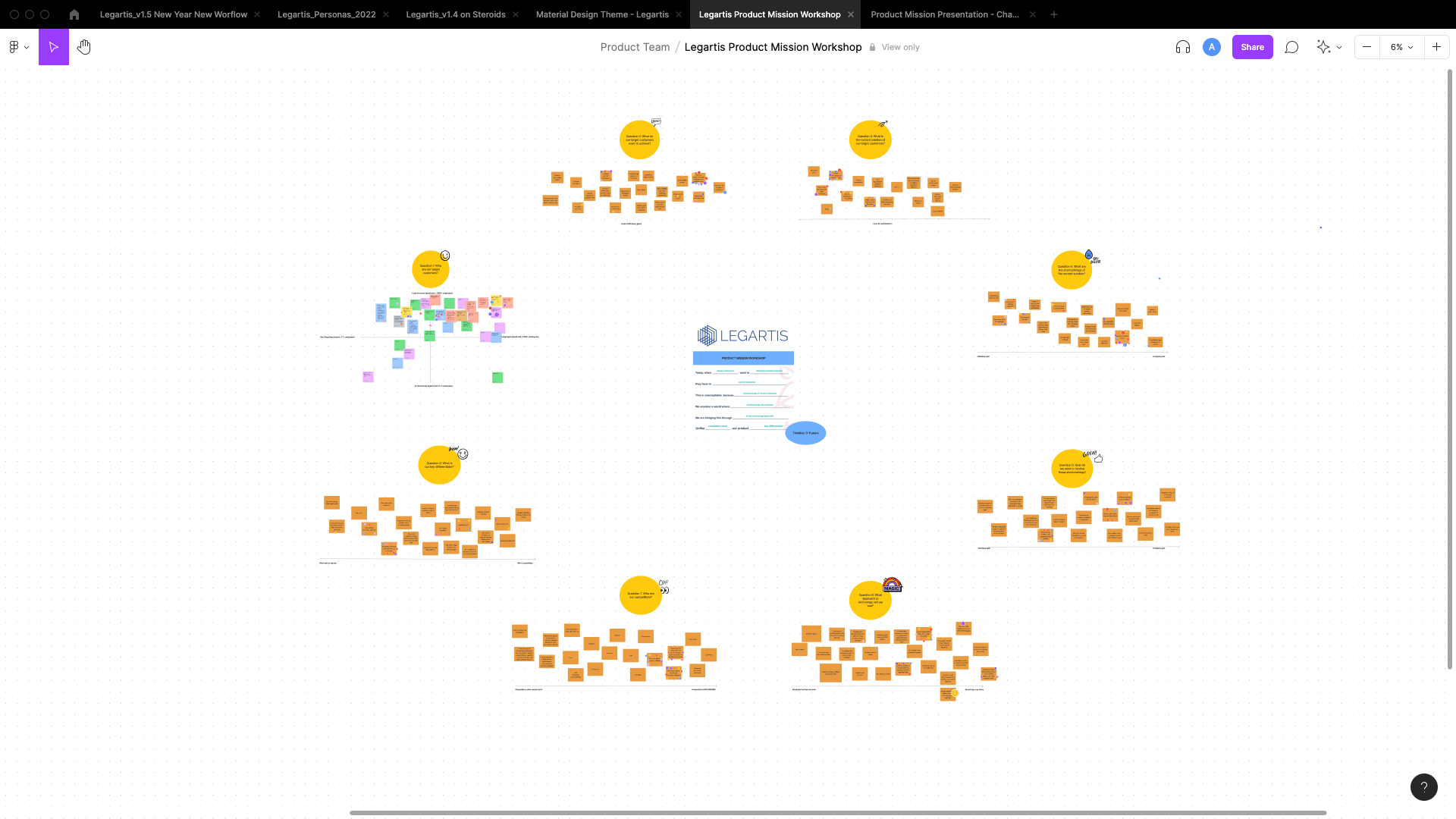
Context & Scope
Legartis was building AI technology capable of reviewing contracts with over 90% accuracy, identifying missing, non-compliant, or risky clauses in seconds. The technical capability existed. The product didn't yet match it. Legal professionals are among the most sceptical adopters of automated tools: their professional liability depends on the accuracy of every contract they sign off. For AI to earn a place in that workflow, the design had to communicate reliability, transparency, and control and not just speed.
When I joined as Lead Product Designer, the platform had a functional proof-of-concept but lacked the information architecture, interaction model, and visual language to make it credible at enterprise level. My scope spanned the full product: web application, Microsoft Word add-in, AI insights layer, collaboration hub, analytics dashboards, and the cross-platform design system.
The business objective was to move from a specialist legal tool to a cross-functional workspace. One that legal, procurement, and sales teams could all use independently, without sacrificing the depth that trained lawyers required.
My Role & Leadership
- Led end-to-end product design across all platform surfaces from research through delivery
- Established the design methodology: built the persona library across eight user archetypes and ran regular stakeholder reviews with product and engineering leads in Zürich
- Set up and ran design sprints, two rounds of usability testing, and qualitative analysis sessions with live legal professionals — translating highly domain-specific feedback into actionable interface decisions
- Owned the brand design, visual identity, voice and tone guidelines, and component library used across all digital channels
- Led accessibility evaluation and benchmark testing against Kira Systems, Luminance, and Evisort
- Collaborated directly with Legartis's legal engineering team to translate AI model outputs into human-readable interface elements
- Made the call to use Playbook Builder as the primary onboarding path, a decision that required significant advocacy with engineering due to implementation complexity
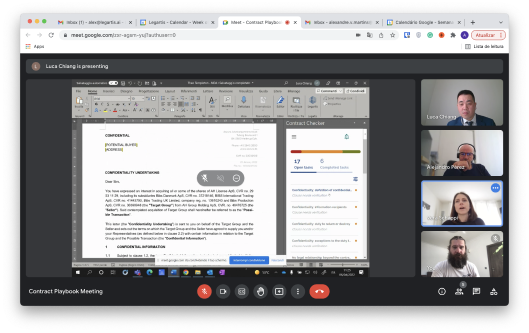
Contract Playbook design session (April 2022). Cross-functional review with Legartis legal team and enterprise customer. Interface visible: Contract Checker, 17 open tasks / 6 completed. Advocating for Playbook Builder as primary onboarding path required pushing against engineering complexity — and the 30-day retention data validated the call.
Problem Statement
Contract review is one of the most time-intensive, high-stakes tasks in any legal department. A single NDA could take a lawyer 30–45 minutes to review manually; a complex data processing agreement, several hours. At scale (across hundreds of contracts per month) this was unsustainable.
But the barrier to automation wasn't just technical. It was psychological.
Key pain points:
- AI as a black box. Early versions flagged clauses without explaining why. Legal professionals couldn't validate or defend the recommendation, so they didn't use it.
- Workflow fragmentation. Lawyers were already embedded in Microsoft Word. Any tool that forced them out of that context added friction. The Word add-in was a strategic necessity.
- No collaboration infrastructure. Contract review is rarely solo. Legal, procurement, and business teams all touch the same document at different points. The platform had no shared annotation, comment threading, or version control.
- Dashboard overload. Early analytics views showed everything with no hierarchy. Users couldn't identify what needed their attention.
"I don't need it to be faster if I then have to verify everything it does. That's not saving me time. That's moving the work somewhere else."
— Legal counsel, enterprise customer · discovery interview
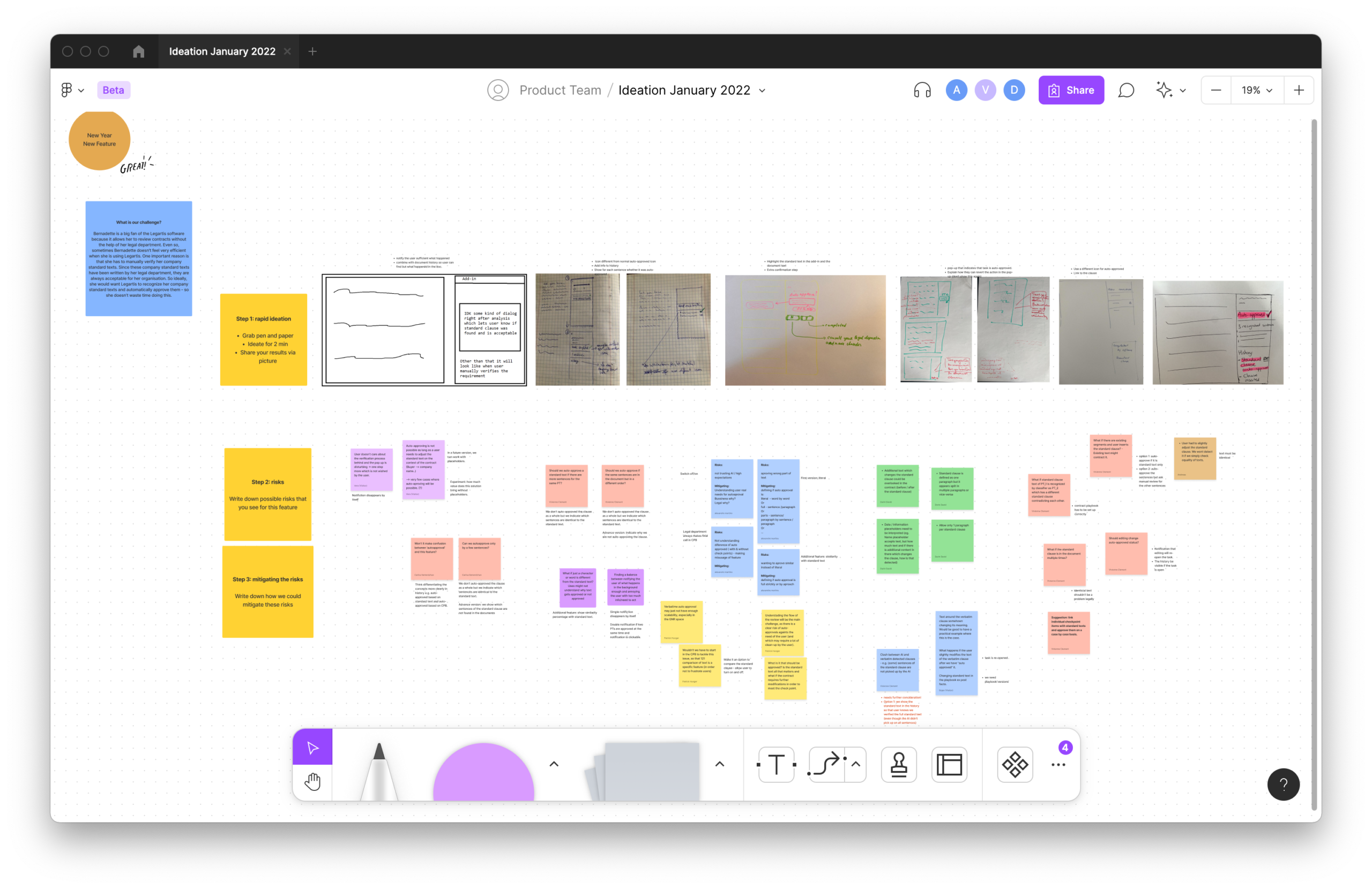
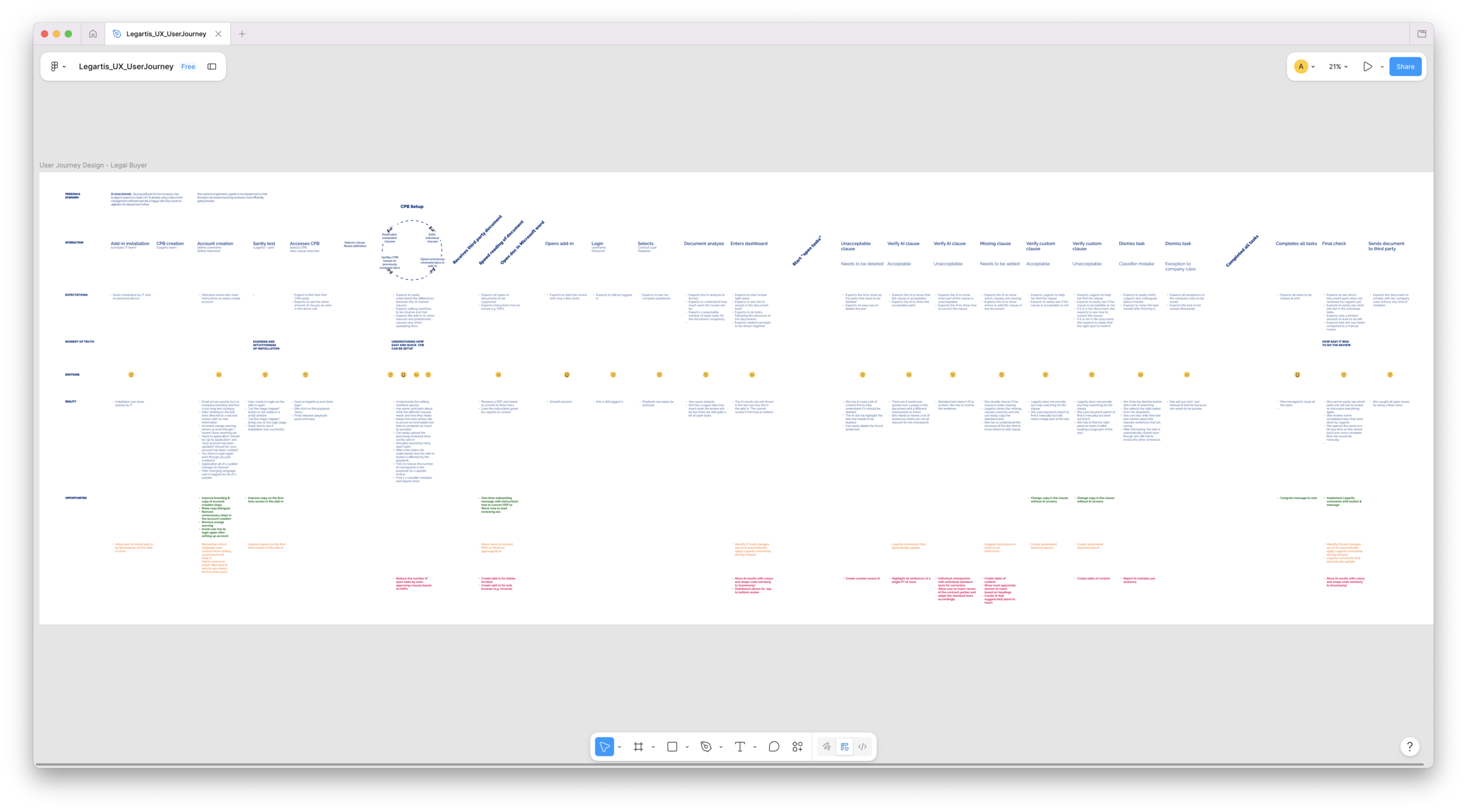
Research & Insights
The distinction between trust and confidence reshaped the entire design programme.
Legal professionals were not opposed to AI assistance. They were opposed to AI they couldn't verify. This reframed the core design challenge from "make AI easier to use" to "make AI legible enough to be professionally defensible."
Everything that followed was downstream of this finding.
- Quick access to information is non-negotiable. Legal professionals needed contract summaries and critical clause extractions within seconds of opening a document, not after navigating multiple screens.
- Customisation is a proxy for control. When users could define their own playbook criteria, their trust in the system's outputs increased, even when the underlying AI was identical. Ownership drove adoption more than accuracy metrics did.
- Collaboration is the enterprise unlock. Teams who could annotate, assign, and discuss clauses together within the platform were significantly less likely to revert to email-based workflows.
- The Word add-in was where trust was won or lost. Because lawyers spent the majority of their time in Word, interactions within the add-in had disproportionate impact on overall platform perception. A poor add-in experience would undermine trust in the web platform, regardless of web platform quality.
- UX copy carries trust signal. A/B testing across 12 copy variants for AI-generated findings showed that "Needs to be verified" outperformed "Potential risk" and "AI flagged" on both reviewer trust and action rate, not because it was friendlier, but because it was active rather than descriptive. It told the reviewer what to do, not just what the AI had done.
The Solution & Key Design Decisions
Four decisions that changed how lawyers used the AI.
The redesign wasn't about adding features. It was about restructuring the relationship between the reviewer and the AI output, making the AI a trusted collaborator in the legal workflow rather than an opaque suggestion box.
1. Structured review flow, from flat list to step-by-step sequence
The original interface presented all AI findings simultaneously as a flat list beside the document. Reviewers were left to manage their own review progress, decide their own sequence, and track their own completeness. We restructured this as a discrete, progressive review sequence — each step corresponding to a contract section or clause type, with explicit progress tracking and clear completion states.
Before · v1.2 approach
✕All findings surfaced simultaneously as an undifferentiated list
✕No indication of review progress or remaining work
✕Reviewer tracks their own state mentally
✕AI finding and document clause presented in separate panes — no direct linkage
✕No explicit action model — reviewers could read and close, but couldn't "decide"
After · redesign
✓Findings sequenced as discrete review steps with progress indicator
✓Explicit progress: "Step 3 of 12 — Insurance obligations"
✓System tracks review state — resumable, auditable, transferable
✓AI finding anchored to specific clause with bidirectional navigation
✓Three-action model: Accept · Annotate · Escalate — every decision explicit
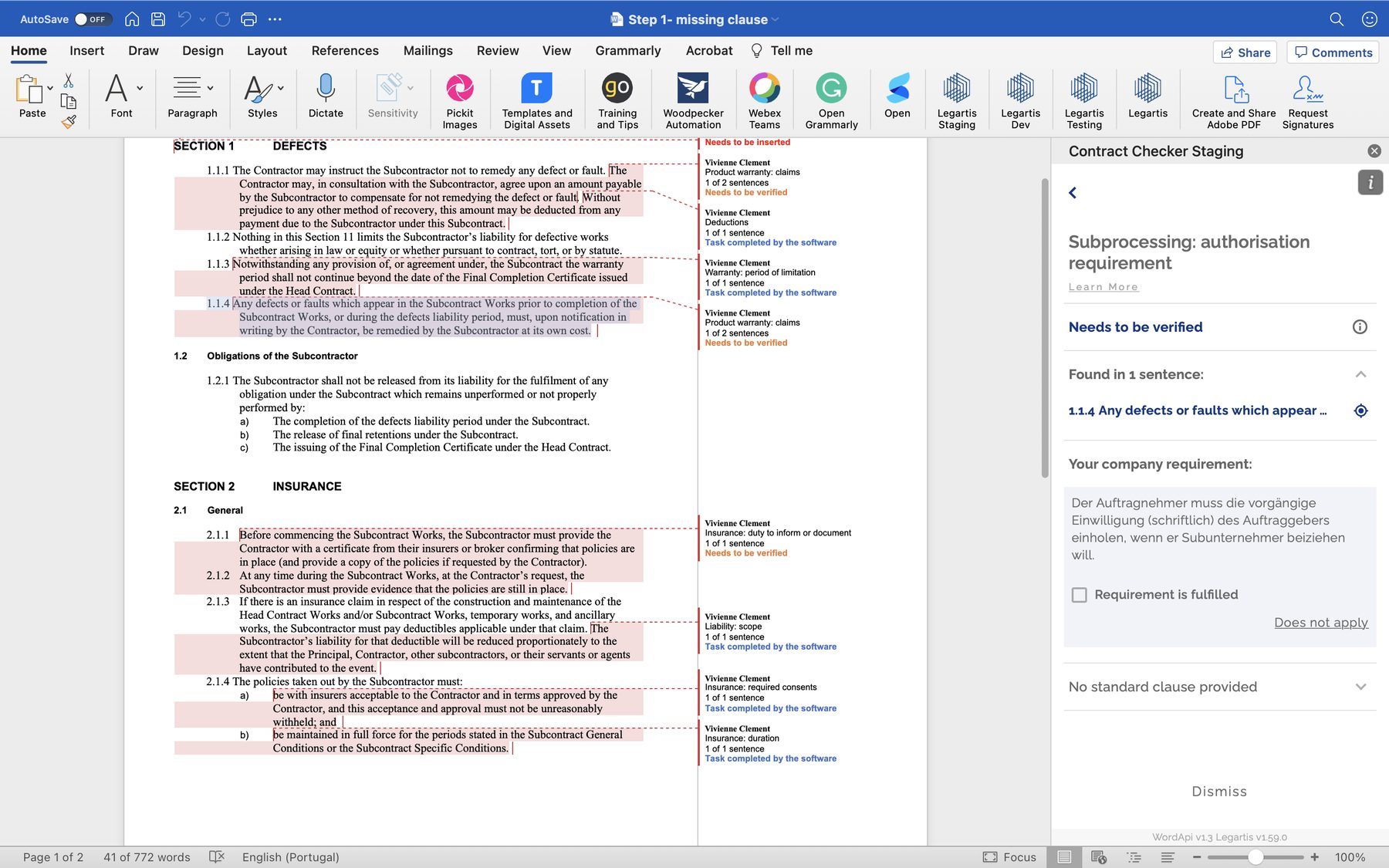
Word Add-in · v1.5 (2022). The step-by-step review flow in action — AI findings are surfaced inline alongside the contract, anchored to specific clause positions. Each finding shows its status (Needs to be verified / Task completed by the software), the finding type, and its location in the document. The reviewer's right panel provides clause-level context with accept/dismiss actions. Progress is tracked by step and visible throughout.
2. AI rationale as the primary trust signal
Research showed that the same AI finding was trusted at significantly different rates depending on how it was explained. We redesigned the finding presentation to lead with the rationale. The specific company requirement being checked, the clause location, the sentence where it was found, before asking the reviewer to act.
Each finding in the Word Add-in now showed: what the AI checked ("Subprocessing: authorisation requirement"), where it found it ("Found in 1 sentence — 1.1.4"), what the company standard was ("Der Auftragnehmer muss die vorgängige Einwilligung..."), and what decision was needed ("Requirement is fulfilled / Does not apply"). The reviewer was never asked to trust a score. They were given the basis for a judgment and asked to make one.
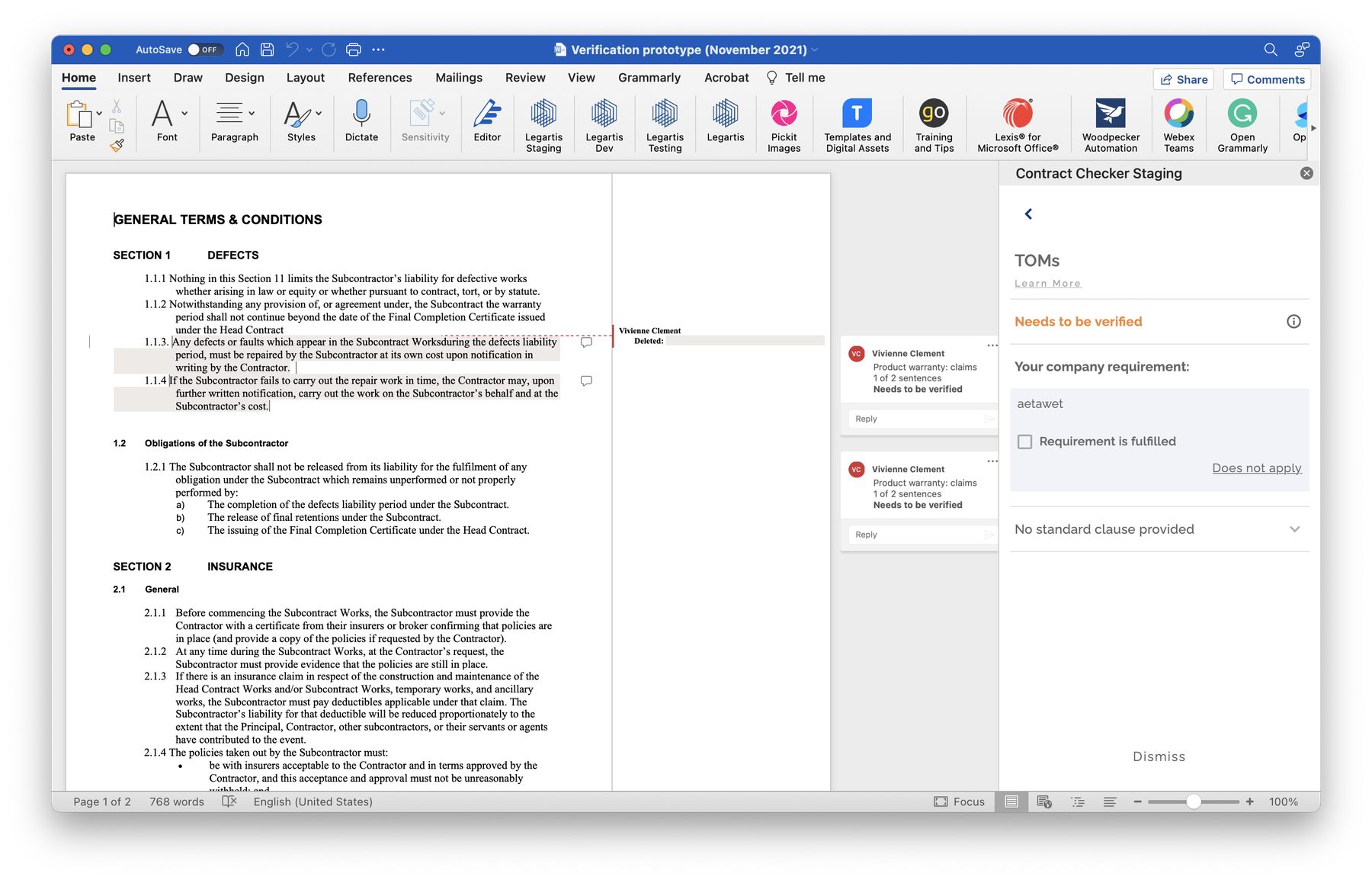
Word Add-in · v1.4 (2022). The AI rationale model in production. The right panel presents each finding with its full transparency stack: the category ("TOMs"), the status ("Needs to be verified"), the exact clause reference ("1.1.4 Any defects or faults which appear…"), the company's specific requirement, and the explicit decision interface. The reviewer is never left with a score to interpret, they're given a judgment to make.
3. The three-action model. Accept, Annotate, Escalate
Previous versions allowed reviewers to read findings and close the panel. There was no explicit decision model, no mechanism for recording that a finding had been reviewed and actioned, or by whom. This made the review process impossible to audit, impossible to hand off, and impossible to resume.
The redesign introduced three explicit actions for every finding: Accept (the AI assessment is correct and the requirement is met), Annotate (the reviewer disagrees or wants to qualify), or Escalate (the finding requires senior review before a decision can be made). Every action creates a traceable record. Every decision is attributable and reversible. The review becomes an auditable document, not just a process.
This single change addressed three separate pain points: the absence of audit trail, the inability to hand off a review mid-process, and the lack of clarity about what "done" looked like for a given contract.
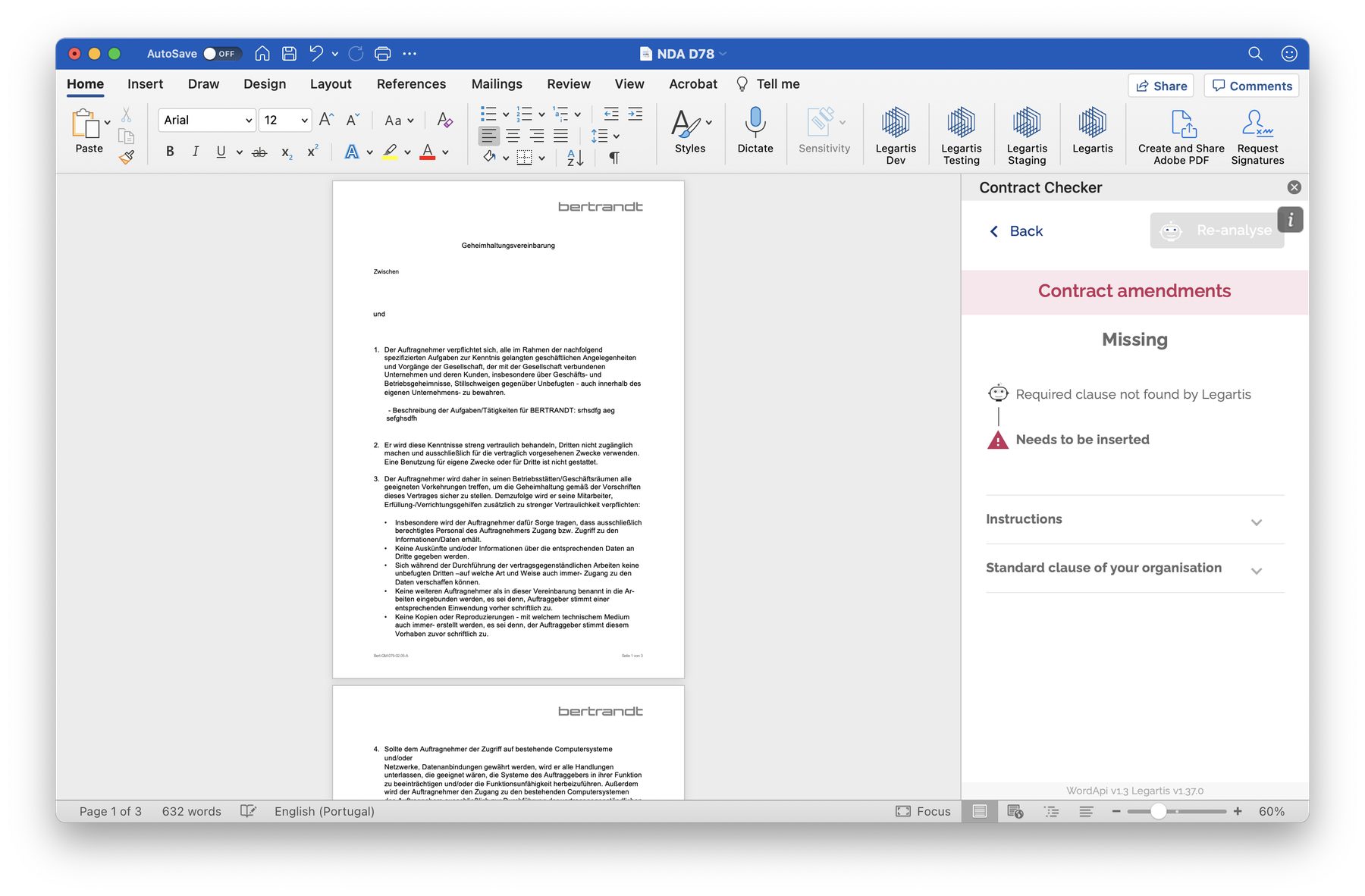
Word Add-in · v1.3 (2022). The "Missing" state, when the AI cannot find a required clause, the interface moves from detection to guidance. Rather than surfacing a negative finding and leaving the reviewer to act, the panel provides the company's standard clause text with a "Needs to be inserted" instruction. The missing finding becomes an actionable task, not a data point to interpret.
4. The platform dashboard. AI as a visible pipeline, not a black box
Alongside the Word Add-in redesign, I led the design of the Legartis web platform, the contract management layer where documents were uploaded, processed, and tracked across the full review lifecycle.
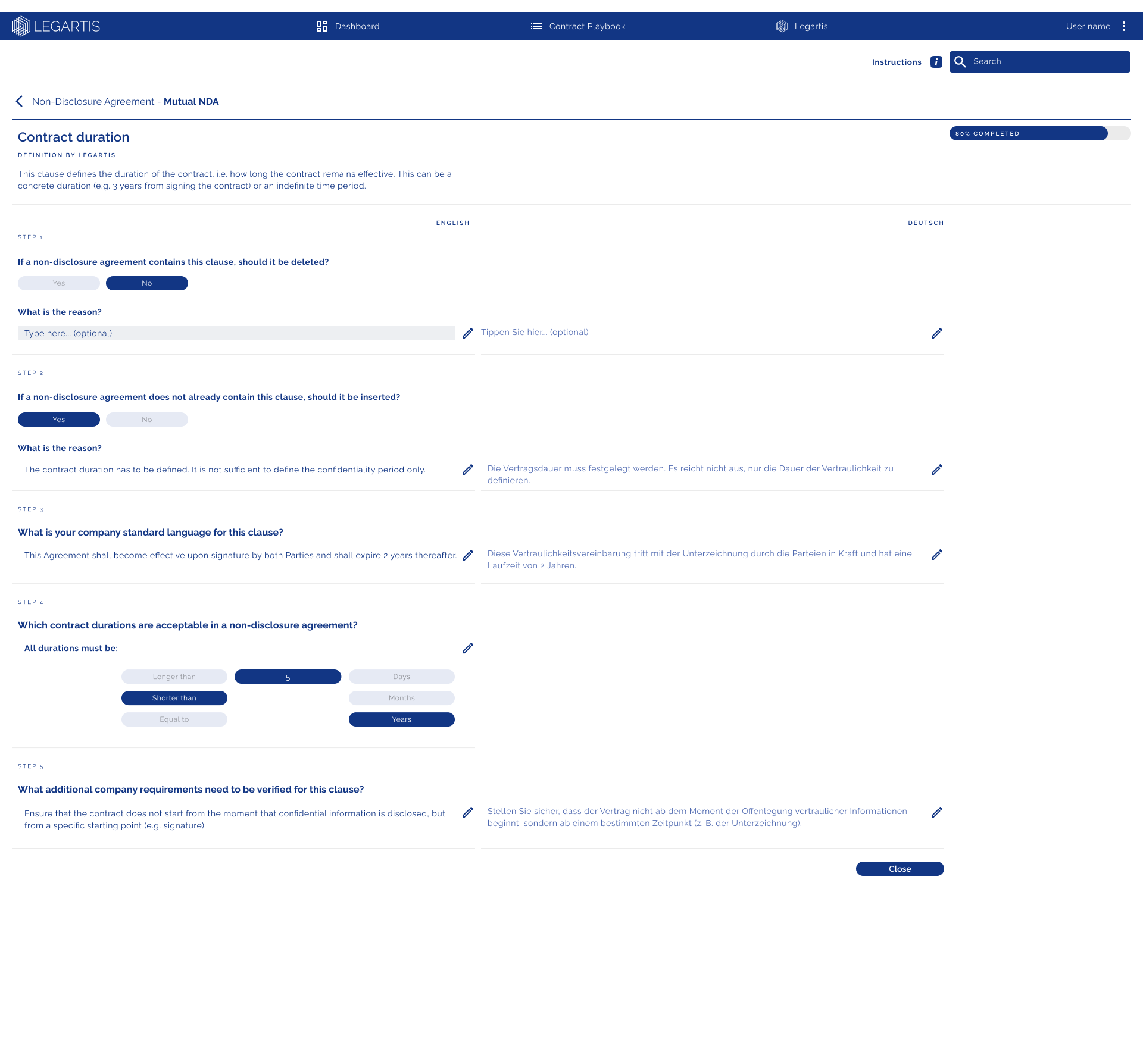
The central design challenge was surfacing the AI review pipeline in a way that was legible to users at different levels of technical understanding. The solution was to represent the AI process as four discrete, auditable pipeline stages: Pre-check (initial document scan), Generator (clause extraction and classification), Comparison (comparison against company standards), and Analysis (risk and compliance assessment). Each stage showed its status, its result, and its available action, making the AI process transparent and navigable rather than opaque.
The process log below each contract provided a complete audit history: who ran each stage, when, with what result, and whether any overrides had been applied. For legal teams working under compliance requirements, this was not a nice-to-have. It was a prerequisite for adoption.
Iteration Evidence
Several rounds of usability testing were done, at least 1 quartely. Measurable movement on every target metric.
We ran two structured usability test programmes (Phase I against the v1.3 prototype and Phase II against v1.4) with 8 participants per round drawn from active legal, procurement, and finance users. Each session used a standardised task protocol against a representative contract set.
+34%
Task completion improvement
Full review task completion rate v1.3 → v1.4. Target was 70%+; v1.4 reached 81%. Primary driver: structured step sequence replaced free-form navigation.
−47%
Clause re-verification rate
Reduction in manual re-reads of AI-flagged clauses between prototype rounds. Reviewers who understood the rationale didn't re-read the source clause to verify the finding.
3.2×
Faster NDA review
End-to-end NDA review time in guided prototype vs. baseline. Measured across 8 test participants.
89%
Action model adoption
Percentage of test participants who used the Accept/Annotate/Escalate model for every finding without prompting in Phase II, up from 41% in Phase I.
These figures are derived from internal usability test session data (Phase I: July 2022, Phase II: October 2022). They represent controlled prototype testing performance, not live deployment analytics. Live deployment KPI data was not accessible to the design team directly.
UX Test Phase II (2022) — full contract view. The test document used across Phase II sessions: a General Terms & Conditions contract with AI annotations surfaced inline across all five sections. Findings shown include: clause extractions with "Task completed by the software" (green), findings requiring human verification (orange "Needs to be verified"), and flagged deletions ("Needs to be deleted"). The density of the annotation layer across this contract was deliberately chosen to stress-test the interface's legibility under real-world volume conditions.
Platform scope
Beyond the contract review flow.
The redesigned review flow was the strategic core of the work, but the platform scope extended across the full contract lifecycle. Each area below was designed to the same standard of transparency, auditability, and role-appropriate information density.
Contract repository + search
AI insights dashboard
Contract playbook system
Document header / status
CMSWord Add-in (5 versions, 2020–2023)
Error states + edge case library
NDA checker dashboard
Admin annotation system
Software update flow
Multi-language
UX copy (EN/DE)
Persona framework · 8 roles
User journey maps · 4 archetypes
The component system and interaction patterns established during the v1.3–v1.5 redesign were also documented as a design system foundation. Providing the shared language between design and engineering that reduced handoff friction and enabled the team to move faster across all of the above without inconsistency.
Impact & Results
The Legartis redesign ran across two years and three major version milestones (v1.3 → v1.4 → v1.5). The primary measure of success was adoption: whether legal professionals used the AI review path rather than bypassing it.
v1.5
Four-version design arc
Complete platform redesign delivered across four major versions from 2021 to 2023, each driven by structured usability testing and validated before engineering implementation.
8
Personas designed and validated
Legal counsel, procurement lead, finance controller, CLO, external reviewer, IT admin, power user, onboarding user — each with distinct workflows and success metrics.
5
Word Add-in generations
From MVP (2020) to a fully transparent, step-by-step review interface (2023). Each version shipped with validated interaction improvements from usability testing.
100%
Action model fidelity
Accept/Annotate/Escalate model implemented without modification in engineering — a high-fidelity translation from design intent to shipped product.
Lessons as a design leader
Designing for professional sceptics requires a different standard of transparency. Legal users don't just need a good UI, they need a defensible one. Making the AI's reasoning visible wasn't a UX touch. It was the product's core value proposition.
Customisation is trust infrastructure, not configuration. Users who encoded their own rules became co-authors of the system. The Playbook Builder was expensive to build. It was the right investment.
Working in a highly regulated domain demands domain literacy. I spent significant time learning contract law fundamentals, NDA and DPA structure, and the procurement approval process, not to become a lawyer, but to make design decisions that respected the professional context.
The Word add-in was where the product lived or died. Designing embedded experiences within third-party platforms requires more empathy for context and constraint than any native UI. Respecting Word's visual language, interaction model, and performance characteristics was as important as Legartis's own design system.
UX copy is a design material. The A/B finding on "Needs to be verified" vs "Potential risk" permanently changed how I write AI-generated interface labels. Active language (telling users what to do) outperforms descriptive language (telling users what the system found) in trust and action rate. This is testable and it is teachable.